
 Open in ChatGPT
Cursor Origin vs GitHub: The Comparison Developers Actually Need
Cursor Origin is an AI-native git forge in early beta. See how it compares to GitHub feature by feature, and whether to try it now or wait.
Cursor announced Origin in mid-2025, and the developer community immediately started asking the obvious question: is this actually a GitHub replacement, or just another tool that will quietly disappear in six months?
The answer is somewhere in between. Origin is a real product with a specific thesis about AI agents writing code, but it's in early beta and has a lot to prove. This guide breaks down what Origin actually does, how it compares to GitHub feature by feature, and whether it makes sense for you to try it now or wait.
What Cursor Origin is#
GitHub is a human-centric code collaboration platform built for manual pull requests and reviews. Cursor's Origin is an AI-native Git hosting platform designed to let autonomous AI agents run parallel tasks, resolve conflicts, and merge code at high frequencies. That's the core difference, and everything else flows from it.
Origin, our code hosting platform, is now live.
— Cursor (@cursor_ai) August 17, 2026
It's fast, easy to use, and deeply integrated with Cursor.
Get started by syncing your repos from GitHub. pic.twitter.com/aqRHavAOQg
A git forge is a platform for hosting repositories, managing pull requests, and collaborating on code. GitHub is a git forge. GitLab is a git forge. And now Origin is Cursor's attempt at one, currently in early staged beta with limited access.
Cursor acquired Graphite, a code review tool, in December 2024. Origin builds on that foundation. The goal is straightforward: own the full developer workflow from writing code in the Cursor editor to hosting it, reviewing it, and eventually deploying it.
What a git forge for the agentic era means#
"Agentic" refers to AI agents that take actions on their own. Instead of just suggesting code, an agent can commit changes, open pull requests, and respond to review comments without waiting for a human to click buttons. GitHub was designed when every keystroke came from a person. Origin assumes AI agents will work alongside developers, generating and reviewing code at speeds humans can't match.
This changes what a git forge has to handle:
- Agent-native permissions: Origin can grant AI agents their own access levels, separate from human users, so teams can control what agents are allowed to do
- Agent-aware review flows: Pull requests expect mixed contributions from humans and agents, with different review expectations for each type
- High-frequency commits: Agents generate many small changes quickly, so Origin is built to handle rapid branching and rebasing without choking
Whether any of this matters to you depends on how much of your workflow involves AI agents today. If you're using Cursor's agent features heavily, Origin's design makes sense. If you're still writing most code yourself, the benefits are less immediate.
Cursor Origin vs GitHub feature comparison#
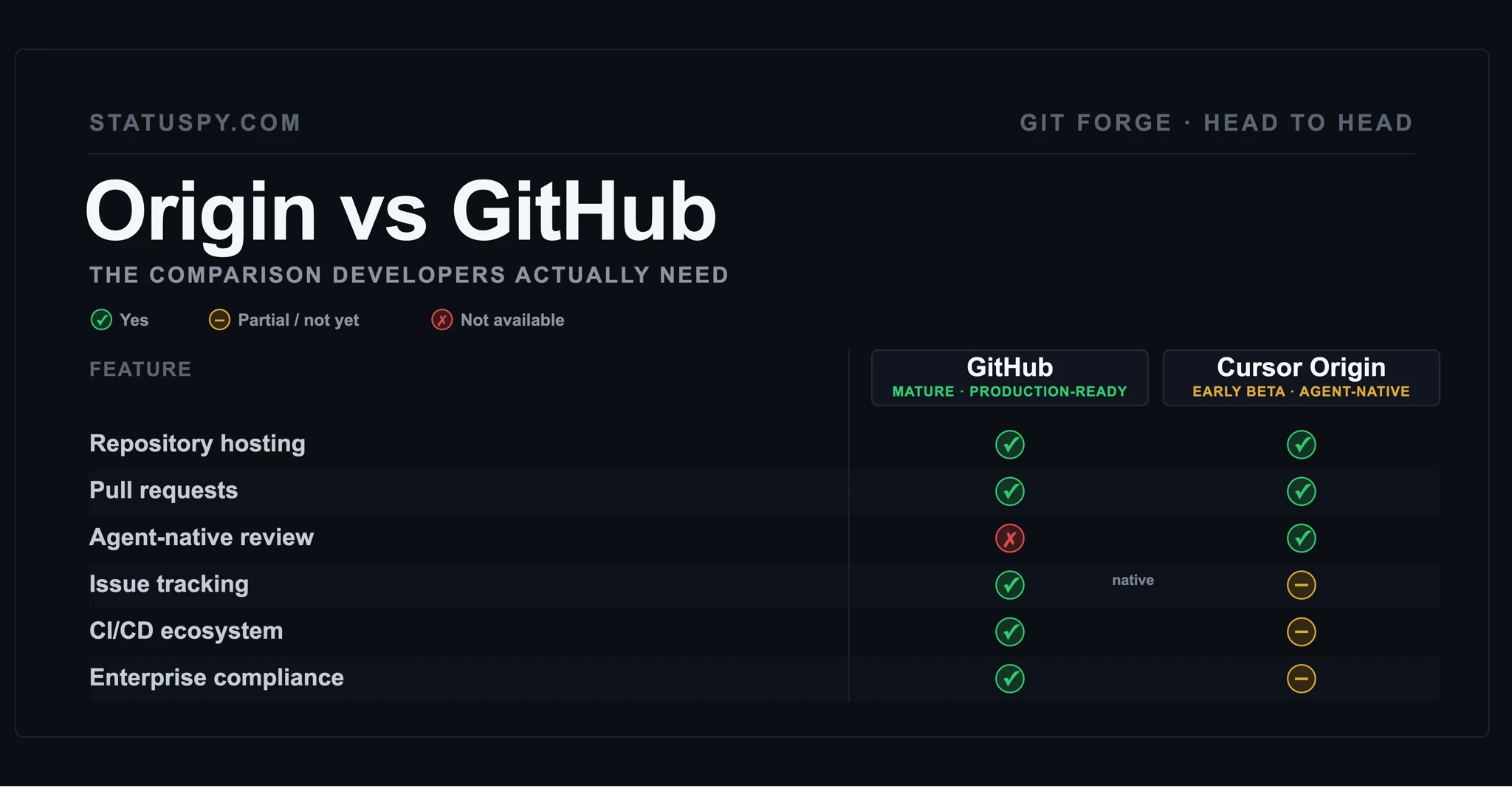
Here's what the two platforms offer side by side:
| Feature | GitHub | Cursor Origin (early beta) |
|---|---|---|
| Repository hosting | Yes – mature cloud and on‑prem (Enterprise Cloud/Server).github+1 | Yes – Origin can host repos directly and mirror from GitHub (cursor.com/codebase).cursor+1 |
| Pull request workflows | Yes – full human‑centric PRs: reviews, comments, checks, protections.github+1 | Yes – full PRs in Origin, plus CLI commands; Cursor cloud agents can open PRs (agent‑aware).cursor+2 |
| CI/CD | Yes – GitHub Actions plus deep ecosystem of external CI tools.github+2 | Yes, but narrower: native integrations with Vercel (deploy previews), Depot, Buildkite; mirrored repos still run CI on GitHub.cursor+3 |
| Issue tracking | Yes – full‑featured Issues (labels, projects, automations, etc.).github+1 | No native Issues yet; GitHub Issues do not migrate with mirrored repos.cursor+1 |
| Enterprise compliance | Strong – FedRAMP Moderate authorization, SOC 1 & SOC 2 Type 2, ISO 27001.github+2 | Not publicly documented; no published SOC/FedRAMP claims for Origin as of current docs.cursor+1 |
| Third‑party integrations | Very broad – thousands of apps in the GitHub Marketplace (CI, deploy, security, etc.).github+1 | Limited but growing – documented apps: Vercel, Depot, Buildkite; app ecosystem “in progress.”cursor+3 |
Code hosting and repositories#
Both platforms host Git repositories. Origin mirrors from GitHub, which means GitHub remains the source of truth during the beta period. Your code lives in both places, with changes syncing between them. Nothing gets lost if you decide Origin isn't for you.
Pull requests and agent review#
GitHub's pull request flow treats every contributor as a human. Origin's flow expects AI agents as first-class participants. The difference shows up in how reviews work: Origin anticipates that some code will come from agents and handles it differently than human-written code.
Issues and project management#
GitHub has mature issue tracking, project boards, milestones, and integrations with tools like Linear and Jira. Origin's issue tracking is limited or not yet available. If your team relies on GitHub Issues for planning and tracking work, this gap matters.
CI and automation#
GitHub Actions is a mature CI/CD platform with thousands of pre-built actions for testing, building, and deploying code. Cursor has not confirmed whether Origin will have its own CI runners or automation features. For now, teams using Origin would likely still run CI through GitHub or another provider.
Access, permissions, and enterprise controls#
GitHub offers granular permissions, SAML SSO, audit logs, and compliance certifications including SOC 2 and FedRAMP. Origin has not published documentation on enterprise features or security certifications. If your organization requires specific compliance standards, this is worth checking before adopting Origin.
How GitHub sync in Cursor Origin works#
Origin's mirroring mode keeps GitHub as the canonical source. You connect your GitHub repository to Origin, and changes sync bidirectionally. Push to Origin, and it appears on GitHub. Push to GitHub, and it appears on Origin.
This design is revealing. Cursor is not asking teams to abandon GitHub. Instead, Origin positions itself as a layer on top, letting developers experiment without migrating. If Origin doesn't work out, your code is still on GitHub exactly where you left it.
The sync also means teams can adopt Origin gradually. One developer can try it while the rest of the team stays on GitHub. There's no all-or-nothing decision required, which lowers the risk of experimenting.
Why Cursor built Origin instead of integrating with GitHub#
Cursor wants to control the full workflow. An editor that integrates with GitHub still depends on GitHub's infrastructure, API limits, and design decisions. By building Origin, Cursor can optimize the entire experience for AI-agent workflows without waiting for GitHub to change.
GitHub's pull request model assumes humans will review changes at human speed. When AI agents generate dozens of small commits per hour, that model creates friction. Origin is designed for this higher-frequency pattern, though whether it delivers on that promise remains to be seen in production use.
There's also a business reason. If Cursor owns the git forge, it doesn't depend on a competitor (Microsoft owns GitHub) for a critical piece of the developer workflow.
Why GitHub is hard to replace#
GitHub has advantages that took years to build, and they create real switching costs:
- Network effects: Most open-source projects live on GitHub, which creates gravity that pulls developers toward it. If you want to contribute to popular projects, you're going to GitHub.
- Integration ecosystem: Thousands of tools connect to GitHub's API, from CI systems to project management to security scanners. Your existing workflows probably depend on several of them.
- Enterprise lock-in: Compliance certifications, audit logs, and SSO configurations take years to replicate. Organizations that have invested in GitHub's enterprise features can't switch quickly.
- Institutional knowledge: Teams have workflows, automation scripts, and tribal knowledge tied to GitHub's specific features. Branch protection rules, GitHub Actions workflows, and integration configurations don't transfer automatically.
Even if Origin becomes a better product for certain use cases, the switching costs are real. Most teams won't move unless Origin offers something GitHub can't provide.
What Cursor Origin still has to prove#
Origin is in early beta. Several unknowns matter for teams considering it.
Uptime and reliability track record#
There is no public uptime history for Origin yet. Teams that depend on their git forge being available around the clock will want to see how Origin performs under real production workloads before relying on it.
Third-party integrations and ecosystem#
GitHub integrates with CI tools, project management platforms, security scanners, and deployment systems. Origin's integration story is still unclear. If your workflow depends on specific integrations, check whether they exist before building around Origin.
Pricing after beta ends#
Origin is free during the beta period. Cursor has not announced pricing for general availability. Teams planning long-term adoption will want to know costs before committing workflows to Origin.
Security certifications and compliance#
GitHub has SOC 2, FedRAMP, and HIPAA options for regulated industries. Origin has not published compliance documentation. If your organization requires specific certifications, this is a blocker until Cursor addresses it.
Should individual developers try Cursor Origin now#
For personal projects or experimentation, Origin is low-risk. The GitHub sync means nothing is lost if Origin doesn't work out. You can try the agent-native features and fall back to GitHub at any time.
Developers already using Cursor's editor will find the tightest integration. The agent-aware features depend on Cursor's AI capabilities, so if you're not using Cursor, Origin offers less immediate value. You'd be using a new git forge without the AI features that make it different.
Should engineering teams migrate to Cursor Origin#
The honest answer is not yet. Origin is in staged beta, and teams running production systems typically want public uptime data, enterprise features, compliance certifications, and confirmed pricing before depending on a new platform.
The GitHub sync feature lets teams experiment without committing. A few developers can try Origin while the team's canonical repository stays on GitHub. This is probably the right approach for most teams curious about Origin: test it on a side project, but don't migrate production repositories.
Once Origin has a track record, published compliance documentation, and clear pricing, the calculation changes. Until then, GitHub remains the safer choice for anything critical.
How to check if Cursor Origin or GitHub is down#
When something breaks, you want to know whether the problem is your code or the platform. GitHub publishes a status page at githubstatus.com, though official status pages sometimes lag real incidents by several minutes.
GitHub finally moved to serverless. pic.twitter.com/VhoELNwUOn
— Sam Lambert (@samlambert) August 17, 2026
Statuspy monitors GitHub independently and can help verify outages without relying on the vendor's own reporting. We check every five minutes from our own servers and require three consecutive failed checks before reporting a service as down. This approach avoids false alarms while catching real incidents quickly.
Origin does not yet have a public status page, which makes third-party monitoring more valuable for teams using it. If Origin goes down and there's no official status page, you're left guessing unless you have independent monitoring.
Tip: When GitHub or your other dependencies go down, find out if it's them or you. Check GitHub status on Statuspy.
The honest verdict on Cursor Origin vs GitHub#
Origin is a real product with a clear thesis: the future of software development involves AI agents as first-class contributors, and existing git forges weren't built for that. Whether that future arrives soon enough to matter is the bet Cursor is making.
GitHub remains the default for production teams. It has the uptime track record, the integrations, the compliance certifications, and the network effects. Origin has none of those yet.
For developers curious about agent-native workflows, Origin is worth experimenting with. The GitHub sync provides a safety net. Try it on a side project, see if the agent-aware features change how you work, and wait for Origin to prove itself before depending on it for anything critical.

 X
X LinkedIn
 Reddit